Getting Ideas Out of Your Head and Into a Workable Plan
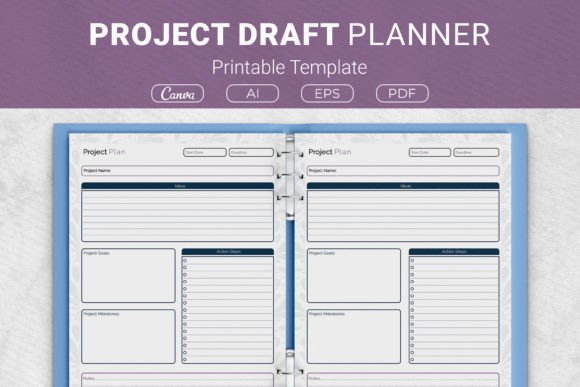
You probably know the feeling. A project idea sparks, your mind races with possibilities, and suddenly you have a dozen half-formed thoughts competing for attention. Without a way to capture and shape those thoughts, many promising ideas simply fade away. This is exactly where a Project Draft Planner Template makes a tangible difference. It provides a structured yet flexible space to move from scattered brainstorming to a clear, actionable outline. The template brings together dedicated sections for ideas, action steps, project goals, project milestones, and notes, creating a single home for your project's earliest and most critical stage: the draft.
Why a Dedicated Drafting Phase Changes Everything
Most people jump straight from idea to execution. They open a task manager, start assigning deadlines, and then wonder why the project stalls. The missing step is the draft phase—a deliberate period of shaping, questioning, and refining before committing to a timeline. A Project Draft Planner Printable Template legitimises this phase. When you sit down with a printed sheet or a digital Canva template, you give yourself permission to explore without pressure. The act of writing by hand on a US Letter or A4 page slows your thinking in a productive way, letting you notice connections and gaps that typing might skim over.
The physicality matters more than many expect. Having a Project Draft Planner Template in a binder, perhaps as part of a larger KDP planner interior, means your draft exists as an object you can revisit, annotate, and keep visible. Digital files have a way of disappearing into folder hierarchies. A printed planner page on your desk stays present, gently reminding you of the thinking you have already done and the next question you need to answer.
When a Project Draft Planner Becomes Indispensable
Certain situations practically demand a structured drafting process. Recognising these can save you from the frustration of false starts.
Creative Professionals Beginning Client Work
Graphic designers, writers, and illustrators often receive briefs that are either too vague or overwhelmingly detailed. Using a Project Draft Planner Template helps you translate a client's wishes into project goals you can actually deliver. You might fill the ideas section with visual concepts, use the action steps area to outline research and moodboarding, and reserve the notes section for technical constraints. Before you even open Adobe Illustrator, you have already clarified the project's boundaries and possibilities. The planner becomes a reference point during client conversations, keeping everyone aligned on what the draft phase uncovered.
Small Business Owners Launching New Offerings
A coffee shop owner thinking about a subscription service, a maker preparing for a craft fair, or a consultant developing a workshop series—each faces competing priorities and limited time. The milestones section of a Project Draft Planner Template helps you sequence what needs to happen without getting lost in details prematurely. You might map out three major milestones: concept validation, materials sourcing, and soft launch, then flesh out action steps for just the first one. This prevents overwhelm while maintaining momentum.
Home Organisers and DIY Enthusiasts
Home projects suffer from scope creep more than almost any other category. A weekend pantry reorganisation somehow becomes repainting the entire kitchen. The structured format of the Project Draft Planner Printable Template encourages you to define project goals at the start: what does success actually look like for this specific effort? Writing "containers labelled and grouped by category" in the goals section is very different from the open-ended "organise pantry." The planner helps you hold that line, or consciously choose to expand it, rather than drifting into chaos.
Students Managing Complex Assignments
Research papers, group projects, and capstone presentations involve multiple components spread over weeks or months. A student using the 7.5 x 9.25 inch or 6x9 inch version can create a portable project hub. The action steps become weekly tasks, milestones align with draft submissions, and the notes section captures feedback from professors. The template works across formats, so students who prefer a digital Canva template can collaborate with group members, while those who focus better on paper can print at home and store the pages in a subject binder.
Aspiring Authors and KDP Publishers
For anyone pursuing Kindle Direct Publishing, the connection to a Project Draft Planner Template runs deep. The template itself can serve as a KDP planner interior, meaning you can design a full book around it and publish on Amazon. But even as a user, an author can benefit enormously. Writing a book is a project that drowns in possibility without structure. The ideas section holds character sketches or chapter overviews. Action steps break the manuscript into manageable drafting sessions. Milestones mark the completion of each act or section. The planner transforms the intimidating blank page into a sequence of achievable moments.
Different Formats for Different Thinkers
The availability of the template in multiple sizes and formats lets you match the tool to your natural workflow. The US Letter and A4 sizes suit desk-based planning, offering plenty of room to spread out your thinking. The smaller 7.5 x 9.25 inch and 6x9 inch formats travel easily, fitting into bags or even larger pockets. A project manager who commutes by train might use the compact version to draft project outlines during the journey, then transfer key points to a digital project management tool later.
Format flexibility also means you can choose between the Ai Illustrator files for customisation, the ready-to-print PDF, or the Canva templates for quick digital editing. Someone planning a community fundraiser might customise the Canva template with event branding before printing copies for committee members. A solo entrepreneur might open the Ai file to adjust section labels to match their industry terminology. This adaptability keeps the planner relevant across very different contexts.
The Quiet Power of Notes and Marginal Thinking
One section often overlooked is the notes area. In many planners, notes feel like an afterthought. In a well-designed Project Draft Planner Template, the notes section deserves attention equal to goals or milestones. This is where lateral thinking happens. You jot down a question that does not yet have a home. You note a risk you just thought of. You sketch a rough dependency between action steps. Over the course of drafting a project, the notes section accumulates the raw material that often leads to the most valuable insights.
Some users treat the notes section as a project journal, dating entries to track how their thinking evolves. Others use it for meeting notes when they discuss the draft with collaborators. The point is that structured planning and open-ended thinking are not opposites; they complement each other, and the template makes space for both.
Making the Drafting Habit Stick
Having a Project Draft Planner Printable Template ready to go removes friction at the moment of inspiration. If you keep several printed copies in the front pocket of your binder, grabbing one when an idea strikes takes seconds. You do not need to decide on a template or format in the moment—the infrastructure is already waiting.
Printing at home makes this effortless and economical. Whether you prefer the crispness of US Letter or the international compatibility of A4, you can produce fresh planning sheets whenever needed. The EPS and Ai files give you the ability to tweak the design if you have specific preferences, while the PDF works perfectly for a grab-and-print workflow.
Digital users can integrate the template into their existing systems. Open the PDF on a tablet with a stylus for handwritten digital planning. Keep the Canva template link bookmarked for quick access from any device. The versatility across print and digital ensures the planner adapts to you, not the other way around.
When Drafting Reveals a Project Should Not Proceed
Not every project drafted should become a project executed, and that is a feature, not a failure. The drafting process sometimes reveals that an idea lacks the substance you initially imagined, or that the resource requirements far exceed what you can currently allocate. Completing a Project Draft Planner Template honestly can save you enormous time and energy by filtering out projects before they consume real resources. The goals section might reveal misalignment with your broader priorities. The action steps might expose dependencies you cannot yet satisfy.
In these cases, the planner still provides value: it captures the thinking for future reconsideration. File the completed draft in your binder. Six months later, conditions may have changed, and that shelved project becomes viable. Alternatively, reviewing old drafts can show patterns in your thinking—types of projects you frequently imagine but never pursue, which is useful self-knowledge for any creative or professional person.
Adapting the Template for Collaborative Projects
While a draft planner is inherently personal, it can also serve as a meeting tool. Distribute copies at the start of a project kickoff and give everyone ten minutes to quietly fill in their understanding of project goals, potential milestones, and initial action steps. Then compare. The differences in perception can be illuminating and prevent misalignment later. The physical act of everyone writing simultaneously creates a focused atmosphere that screen-based planning sessions often lack.
For remote teams, sharing a filled Canva template digitally achieves a similar effect. One person compiles the input into a master draft, and the template's clear sections make it easy to see where ideas converge and where they diverge. The structure does the heavy lifting of organising the conversation.
Choosing the Right Template for Your Context
Consider what you will actually use. If you prefer handwriting, the printable PDFs on US Letter or A4 are the natural starting point. If you publish notebooks or planners through KDP, the Ai and EPS files give you the source material to create a polished interior that your customers can appreciate. If you live between devices and often start projects on your phone, having the Canva template accessible means you can begin drafting wherever you are.
The 6x9 inch format deserves special mention for anyone who carries a journal or uses a smaller bag. It fits comfortably alongside notebooks, making it a natural companion for reflective project planning on the go. The 7.5 x 9.25 inch size splits the difference between full letter pages and pocket formats, offering a generous writing area without taking up your entire workspace.
Ultimately, the Project Draft Planner Template serves a single purpose: creating a bridge between idea and reality. By providing clear containers for goals, milestones, action steps, ideas, and notes, it structures the often chaotic early phase of any project. Whether that project is a book, a business launch, a home renovation, or a creative commission, the drafting process benefits from intentional space. The template offers exactly that—space to think, space to plan, and space to prepare before you begin.