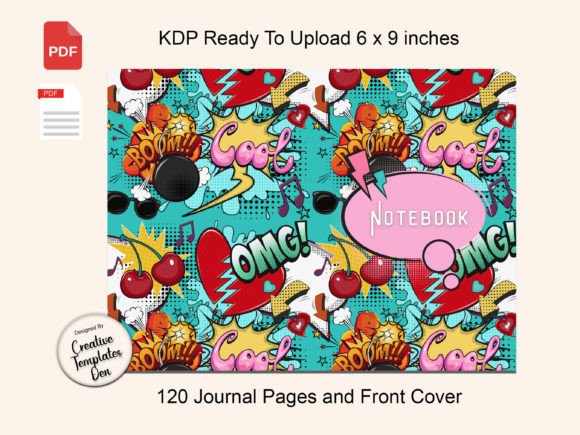
PopArt KDP Complete Notebook: A Smarter Way to Start Your Self-Publishing Line
Building a low-content publishing business often begins with finding the right journal or notebook to offer. The search can be time-consuming and full of trial and error. PopArt KDP Complete Notebook arrives as a shortcut you can trust, providing a ready-to-upload 120-page lined paperback interior along with a matching, high-resolution cover—all sized perfectly at 6” x 9”. For anyone tired of wrestling with formatting or cover design, this package represents a practical solution that has already passed Amazon’s quality checks.
Still, even the most convenient product can be misused if you skip the fundamental checks most beginners overlook. I’ve seen too many creators upload a “ready” file only to face rejection emails because they didn’t confirm a handful of small details. That’s not the fault of the product—it’s a gap in understanding. Let’s walk through what makes this particular notebook pack reliable, and how to avoid the subtle mistakes that can trip up any self-publisher, whether you’re launching your first book or your fiftieth.
Why the PopArt KDP Complete Notebook Gets the Technical Details Right
Many downloadable notebook templates clutter the marketplace with interiors that look fine on screen but fail KDP’s automated review. The margin between the spine and the first line might be off, the text or lines could be too close to the edge, or the resolution of embedded elements falls short of the required 300 DPI. Creative Templates Den designed this pack to stop those problems at the source. The interior PDF features modern lined paper with crisp spacing that doesn’t drift when printed, while the cover file includes the front, back, and spine as a single cohesive wrap, eliminating alignment guesswork. The entire bundle was tested on Amazon and passed the quality check without adjustments, which is a strong signal that the creators understand KDP’s current requirements.
That peace of mind becomes valuable because some self-publishers waste entire afternoons correcting a cheap template only to discover it still gets blocked. When you’re focusing on keywords, listing optimization, and traffic, you don’t want interior specs eating up your mental energy. The PopArt pack hands you a foundation that lets you bypass that stress, but you still need to treat it like a tool, not a magic button.
Overlooking Trim Size Compatibility—Even with Perfect Files
One of the most common missteps I observe is downloading a "ready-to-upload" notebook for a trim size you didn’t intend to use, simply because the cover caught your eye. The PopArt kit is built for KDP’s 6” x 9” paperback option, a popular and versatile format for journals, planners, and notebooks. If your brand already uses a 7” x 10” or 8.5” x 11” line, dropping this file into that larger trim will distort the cover, stretch the interior lines, and almost certainly lead to a poor customer experience.
Before you hit download, check your existing catalog and storefront strategy. Does a 6” x 9” journal fill a gap you’ve been wanting to cover? If so, this is a natural fit. But if you’re determined to stick with a larger format, you’d be better off looking for a template built specifically for that dimension, rather than trying to resize a PDF and hoping the bleed and margins still work. Resizing a flattened PDF often introduces subtle scaling errors that KDP’s reviewer will catch—and reject. The safer path is to match the product to your planned size from the start.
Assuming “Ready-to-Upload” Means You Don’t Need to Preview
It’s tempting to take a file that passed previous quality checks and upload it directly without opening the KDP previewer. Even though the PopArt KDP Complete Notebook earned its approval seal, it’s still wise to spend five minutes clicking through the digital proof. Print-on-demand production environments occasionally update their processes, and a slight shift in how the spine is calculated can alter where the cover design sits. By using the Launch Previewer or the online Previewer integrated into KDP, you can confirm that no text or graphical elements drift into the safe zone and that interior lines appear as expected.
What should you watch for? Open the interior PDF on your screen first. Scroll quickly to the middle of a page and check that the lines extend evenly to the margins without any clipping. Then upload both cover and interior to KDP and run the preview. Flip through a few pages, paying attention to the alignment of the lines near the binding edge. If anything looks misaligned—unlikely with this tested file, but still worth verifying—catch it before a customer does. Proactive previewing turns a solid product into a risk-free one.
Ignoring the Cover’s Role in Shaping Buyer Perception
A notebook’s cover is its primary sales tool. The PopArt design in this pack is described as crisp, high-resolution, and modern, making it suitable for audiences who appreciate bold, creative aesthetics. However, some sellers make the error of not matching the cover’s visual energy to the notebook’s interior purpose or to their target demographic. If you’re positioning this journal for business planning or serious note-taking, does the vibrant pop art style speak to that audience? That’s a strategic question you should ask before publishing.
This doesn’t mean the design is wrong—it’s versatile enough to attract artists, students, and journalers alike. But consider whether you need to adjust your product title, description, and keywords to align with the visual you’re putting forward. For example, if the cover leans abstract and colorful, frame the notebook as a creative companion or brainstorming journal rather than a formal executive log. The mismatch between cover mood and product promise frustrates buyers and leads to returns, even when the interior paper quality is excellent. A quick alignment of your marketing language with the cover art turns a solid product into a cohesive offer.
Forgetting to Verify the Usage License (Yes, Even with Finished Files)
Most ready-made KDP packs come with a license that explains what you can do with the files—sell them as part of a finished printed book, or in some cases, modify only the cover text? PopArt KDP Complete Notebook is clearly intended for you to publish as a paperback on Amazon, and the seller encourages you to reach out if you need help, which implies a commercial-friendly license. But as a best practice, always scan the included Word document or any license text file for restrictions before listing. Some template creators set a limit on how many copies you can sell, or they prohibit putting your own branding inside. The description here states it’s a "complete ready to upload" package "for you to use," so typical commercial use should be permitted, but checking takes seconds and eliminates legal headaches down the line.
If you ever decide to modify the interior—maybe adding a title page or a personalization section—confirm that the license permits alterations. The same goes for using the cover design as a base for other products. Reaching out to Creative Templates Den with a quick message can resolve any questions and build a relationship with a creator who might offer more designs later. Trustworthy sellers welcome these inquiries and often update their licenses based on customer feedback.
Practical Steps to Get the Most from This Notebook Pack
Once you’ve confirmed trim size, previewed the files, and read the license, the uploading process is refreshingly simple. The included Microsoft Word instructions with diagrams remove any remaining guesswork. Still, a few proactive habits can improve your outcome:
- Open the interior PDF and print one page at home. You’ll see exactly how the line weight and spacing look on physical paper. This step takes two minutes and can catch a rare issue like printer color profile interference that might affect Amazon’s production.
- Check KDP’s paperback paper color options. Your chosen paper (white or cream) interacts differently with line darkness. The PopArt interior was tested, but if you switch to cream paper, the contrast might soften slightly—acceptable for a notebook, but worth knowing.
- Upload the cover and interior separately, as intended. The pack provides one front/back cover file and one interior file. Don’t merge them; KDP expects them to be submitted as two distinct PDFs for paperback setup.
- Fill out the KDP details carefully. The 120-page count is fixed, so your book description should accurately state the number of pages. Overpromising or undercounting leads to dissatisfied readers.
Distinguishing This PopArt Notebook from Lesser-Quality Alternatives
The self-publishing market currently contains many notebooks with lackluster interiors—lines that are too thick, too thin, or placed right at the edge of the page, causing text to disappear into the binding. The PopArt KDP Complete Notebook’s modern lined paper uses spacing that feels comfortable for handwriting without crowding, and the lines remain within the safety margins so they won’t be swallowed by the glue. Combined with a cover that holds its clarity at print size, this product reflects a developer who took the time to understand what Amazon’s press expects.
When comparing similar offerings, check for red flags: interiors that are not vector-based (which can pixelate at scale), covers with artwork that looks blurry at 100% zoom, or download packages that don’t include both cover and interior. The PopArt bundle eliminates that guesswork by delivering a complete, paired set. That cohesion matters because even a slight variation between cover spine width and interior page thickness can cause print misalignment if the spine isn’t calculated correctly. Since this set passed Amazon’s check as-is, the spine dimensions match the interior page count exactly.
Before You Click Publish: A Final Reality Check
Even the most carefully prepared notebook deserves a strategic launch. Avoid publishing into a crowded subcategory without a clear point of differentiation. The PopArt design gives you a visual starting point; now build a listing that leverages that uniqueness. Use strong keywords that connect "pop art journal" with the intended use—gifts for creative writers, sketch-friendly notebooks, etc. Don’t copy generic descriptions from top sellers; write your own and highlight the practical benefits of the modern lined interior that’s ready to use.
And remember: while the PopArt KDP Complete Notebook removes the biggest technical hurdles, your long-term success still depends on how you position it. The files handle formatting, so you can invest your time in research, pricing strategy, and connecting with the right audience. That’s the smart way to build a low-content business—leveraging reliable foundations like this pack while applying your own market insight.
Creative Templates Den made a product that genuinely simplifies the path to a live listing. By avoiding the mistakes above, you can move from download to published book in less time, with fewer headaches, and with a notebook that looks and feels professional. The ready-to-upload promise is only as strong as your attention to those final details, and now you know exactly which ones matter most.