Hourly Planner KDP Interior Template: A Practical Resource for Consistent Planner Production
When you strip away the noise from a productivity tool, what remains is a sequence of containers for intention and observation. An hourly planner does exactly that — it gives you a place to assign meaningful work to specific segments of the day and then reflect on what actually happened. The Hourly Planner KDP Interior Template takes that functional core and packages it into a ready‑to‑publish format that removes the friction of designing, testing, and formatting interiors from scratch. Whether you are a publisher adding a new product to your KDP catalog, a coach building a companion resource for clients, or a solo professional who wants a customized book that matches your own rhythm, this template changes the starting point from a blank screen to a series of decisions about content and structure.
What the Template Actually Delivers
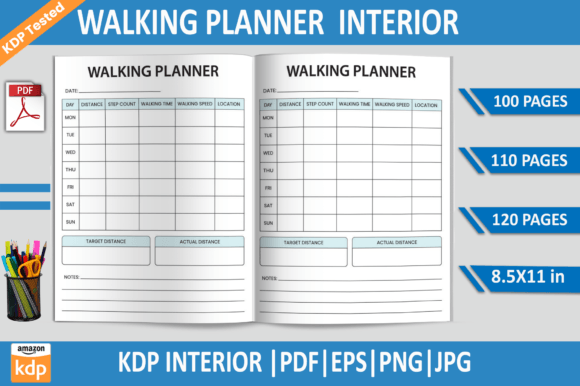
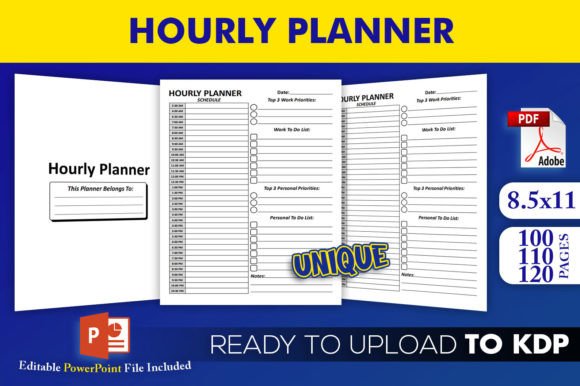
The package is designed around a single trim size — 8.5 x 11 inches — with no bleed, which means the interior elements stay comfortably away from the page edges and do not require extra safety margins. Inside the download you receive an editable PowerPoint source file (.pptx) and three PDF interiors pre‑tested on KDP. Those PDFs represent page‑count variants of 100, 110, and 120 pages, so you can align the planner’s thickness with a specific purpose (a daily tracker, a seasonal work log, a quarterly project companion) without manually adjusting every layout shift. All interiors are high resolution, which matters when thin lines, small time slots, and consistent grid rendering affect the perceived quality of a printed book.
Where This Template Fits in a Broader Publishing Process
KDP interior creation often sits between two common bottlenecks: excessive back‑and‑forth design revisions and last‑minute worries about print‑ready file acceptance. By starting with an interior that has already passed KDP’s technical checks, you move directly into the content adaptation phase. Instead of scrutinizing margin offsets, gutter calculations, or ink density warnings, your attention goes to decisions like whether the hourly grid needs a notes column, a priority flag, or a hydration tracker. That shift is significant for anyone who wants to release planners on a regular schedule — weekly spreads, student editions, project‑specific logs — because the production cadence becomes predictable.
How the Interior Works Before the Project Even Begins
Well before a listing goes live, the template helps you prototype how an hourly block structure feels on paper. You can open the editable PowerPoint file, duplicate a section, and add a prompt or reflection box without disrupting the proven layout backbone. This pre‑draft exploration is often overlooked. Publishing a planner that no one wants to use happens when the design makes assumptions about how people divide their attention. Testing a few interior spreads with different heading treatments or time ranges, while still relying on the stable no‑bleed grid, gives you direct feedback about whether the 7 AM to 9 PM window is restrictive or exactly what a niche audience needs.
Integrating the Template with Your Existing Tools and Routines
The editable source file works inside PowerPoint, a tool that most people already know or can pick up quickly without subscription fatigue. You can treat it as a collaborative surface: drop a company logo into the master slide, align a recurring header to match a brand kit, or export a single-page sample to share with beta readers before committing to a full print run. From there, the finished PDF moves into KDP’s upload interface, where the template’s consistent dimensions and lack of bleed simplify the previewer check. Beyond the Amazon ecosystem, the same high‑resolution PDF can be sent to a local print shop for a spiral‑bound desk copy, turning the digital asset into a physical test tool before the first customer buys it.
Creating a Daily Driver for Your Own Workflow
If you are the end user, you might take the 100‑page variant and run it through a duplex printer or a binder. The advantage is complete control over what each hourly block asks of you. Add a small em dash line for top‑three priorities at the beginning of each day directly in Adobe Acrobat’s comment tool, or leave a digital sticky note layer in a tablet annotation app. Because the interior uses a clean, predictable layout, apps like GoodNotes or Notability treat it as a stable background, so your handwritten entries stay legible and aligned.
Publishing a Niche Planner for a Specific Audience
When you want to sell a planner for freelance designers, real estate agents, or nursing students, you start with the template and then adjust the header text, add industry‑specific checklists, or insert a weekly review template on a blank facing page. The PowerPoint file makes it easy to batch‑replace a placeholder like “Today’s Focus” with a phrase that resonates with your buyer. The three page‑count options let you match the length to the natural rhythm of the profession — a 120‑page interior might suit a semester, while a 100‑page version might fit a 100‑day challenge or a short‑term project sprint.
Quality Control and Consistency Across Page Counts
One underappreciated challenge in planner publishing is maintaining alignment when the same design appears at different thicknesses. A page that feels balanced at 100 pages might feel sparse or crowded at 120 if margins, font sizes, or grid heights shift even slightly. The template sidesteps that problem because each page‑count variant comes as a dedicated PDF file, already inspected on KDP. You can open them side by side in a viewer and confirm that the hour lines, header spacing, and whitespace allocation stay uniform. High‑resolution output prevents soft, pixelated lines creeping into the printed copy, especially important for the thin rules that define time slots.
Long‑Term Use, Revisions, and Planner Series Growth
A planner business rarely stops at one title. After the first listing, you may want a quarterly edition, an undated companion, or a pocket‑sized variant. The editable PowerPoint source file becomes a reusable resource. Because you control the base layout, you can adjust trim margins or column widths for a sister project while keeping the core hourly grid recognizable. This approach reduces the risk of introducing subtle errors each time you branch out. You might build a small library of custom elements — a habit tracker, a meal log, a call block schedule — and slide them into the template framework, exporting new PDFs that always start from a proven‑to‑work interior structure.
How the Template Interacts with People, Decisions, and Feedback Loops
Planner templates are not isolated assets. They touch collaborators (editors, cover designers, proofreaders), customers (who care about paper feel and logical flow), and the KDP platform itself (which values consistent print‑ready files). When you share the PowerPoint source with a co‑creator, the conversation moves faster because you are not explaining technical specs from scratch — you are discussing content choices on top of a stable technical base. Customer feedback about a particular daily layout can be applied directly to the master slide, and a revised PDF can be ready for upload within an hour. The template therefore shortens the loop between identifying a page‑level improvement and releasing it in the next edition.
Making the Planner Feel Like a Natural Tool Rather Than a Forced Routine
Many hourly planners fail because they demand rigid adherence to a schedule that real life ignores. The template gives you the container, but the way you fill it decides whether it becomes a burden or a relief. In a work context, time blocking works better when the planner itself carries the right contextual cues — a small area for “unplanned work captured,” a buffer column, or a check‑in point at the end of the day. Since you can edit the interior, you can bake those gentle nudges right into the page design. The goal is not to build a perfect calendar but to create a document that helps someone stay honest about where their hours actually go.
Storage, Sharing, and Versioning Best Practices
Once you customize the template, keep a master version of the PowerPoint file that holds only the foundational grid and non‑specific labels. Branch out into dated editions or topic‑specific versions from that master, so you never lose the clean starting point. Name your PDF exports clearly — for example, “Hourly‑Planner‑120‑Interior‑v3‑Q2.pdf” — so Amazon KDP’s content dashboard gives you quick visual confirmation that the correct file is attached. If you work with a team, store the editable source in a shared cloud folder with version comments that explain what was changed and why, especially if you adjust the grind or add sections that affect the page flow.
Extending Value Beyond the Initial Upload
The template can also serve purposes outside of direct KDP publishing. You might use the interior PDF to create a low‑cost lead magnet — extracting a few sample pages into a downloadable daily plan sheet that builds visibility for your full book. Or you could print the 110‑page interior on premium paper and insert it into a disc‑bound system, using the hourly template as the backbone of a physical planner you offer at live workshops. Because the file set is already structured for 8.5 x 11 with no bleed, those physical products come together without additional design overhead.
What Matters Most in Daily Use
Whether you make planners for others or simply need one for your own desk, what eventually matters is whether the hourly structure feels supportive rather than evaluative. The Hourly Planner KDP Interior Template provides a technically sound, adaptable starting point that respects both the publishing logistics and the quiet, daily practice of writing down what you intend to do and what you actually accomplished. The clear formatting, pre‑tested compatibility, and editable source file let you spend less energy on file preparation and more on designing the experience between those lines.