Daily Gratitude KDP Interior: Avoid These Common Mistakes That Jeopardize Your Journal’s Success
You landed on a Daily Gratitude KDP Interior pack and the promise feels immediate: 120 ready‑to‑upload pages, high‑resolution files, everything tested for Kindle Direct Publishing. A gratitude journal printed through print‑on‑demand seems like the fastest road to passive income. But quiet, easy‑to‑miss errors during setup can turn that polished interior into a book that earns returns instead of reviews. This isn’t about scaring you away. It’s about showing what thoughtful publishers check before they hit publish, so your journal arrives in customer hands looking exactly the way you intended.
What Actually Arrives in a Daily Gratitude KDP Interior Bundle
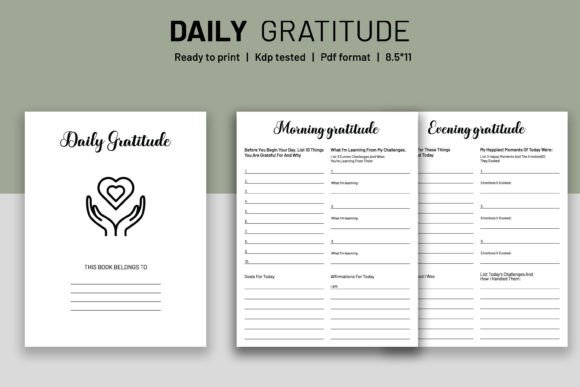
The product isn’t a physical book. It’s a set of digital files built specifically for Amazon KDP or any POD platform that accepts print‑ready PDFs. The typical package includes an editable .AI file (Adobe Illustrator), high‑resolution PDF and PNG files, all sized at 8.5 × 11 inches with bleed. A dedicated intro page sits at the front, and the entire 120‑page interior has been KDP tested — meaning the creator ran it through Amazon’s upload checks successfully. That “tested” label saves you from immediate technical rejections, but it doesn’t replace your own quality control. When the files are handed to you, the responsibility for a professional finish shifts entirely to your workflow.
Mistake 1: Believing “Ready to Upload” Means No Adjustments Are Needed
The biggest illusion is that a KDP‑tested interior works like a one‑click template. In reality, KDP testing confirms the PDF passes Amazon’s automated file inspection: the page count, bleed, and margins fall within acceptable ranges. What it doesn’t guarantee is that the design fits your specific brand, that the font rendering is flawless on every printer, or that the intro page speaks to your audience. Skipping customization isn’t just a creative oversight — it can make your journal look indistinguishable from dozens of others using the same base file. When customers sense a mass‑produced shell, they hesitate to leave five‑star reviews, and your conversion rate suffers.
The editable AI file is there for a reason. Even if you’re not a designer, spending an afternoon adjusting the intro page to include your logo, a short dedication, or a simple instructions block can raise perceived value enough to justify a higher price. If you don’t touch the files at all, at least open the PDF on a large screen at 100% zoom to confirm nothing shifts after upload. Small acts of verification repay you in lower return rates.
Mistake 2: Mishandling the Bleed — or Ignoring It Entirely
An interior labelled “with bleed” means images, backgrounds, or decorative edges intentionally extend beyond the trim line. That extra 0.125 inch of design prevents unsightly white slivers after Amazon’s printers cut the paper. A surprisingly common error: uploading the bleed‑ready PDF but selecting a trim size that doesn’t match — or worse, toggling “no bleed” inside KDP’s settings. The result is a physical copy where the page edges flash white streaks, and the book looks amateur.
Before you upload, open the PDF’s document properties and confirm it’s built for 8.5 × 11 inches. In KDP’s paperback setup, choose the identical trim and check the “bleed” box. Then use the built‑in previewer to flip through at least five random pages. Look for any element drifting dangerously close to the cut line. If you spot it, go back to the editable file and pull content inward by another 0.25 inch. It’s tedious, but far easier than apologizing to buyers.
Mistake 3: Opening the AI File Without Understanding How It Behaves
The editable .AI file is a gift for those comfortable with Illustrator, but a ticking bomb for everyone else. A user who double‑clicks the file in a viewer that interprets text differently can unintentionally break paragraph flow, lose linked images, or corrupt the layered structure. Later, when they “export as PDF,” the gratitude lines might run into the spine margin or disappear altogether.
If Illustrator isn’t a tool you know well, lean on the high‑resolution PDF for the final upload. Build any tweaks — like changing the year or adding a daily affirmation — inside a program you trust, then place the modified page back into the PDF using an editor that preserves bleed. For small changes, even free online PDF tools can insert a new intro page without destabilizing the rest of the layout. The AI file shines when you want to rebrand the entire interior for a niche (e.g., a gratitude journal for nurses or new parents), but its power only helps if it’s handled correctly.
Mistake 4: Underestimating the Intro Page’s Role
A blank or cookie‑cutter intro page squanders prime real estate. Readers open a gratitude journal looking for structure plus a personal touch. If the first page after the cover simply says “Gratitude Journal” in a generic font, the book feels anonymous. That impression travels into reviews — people mention thoughtful details far more often than we expect.
Take the editable intro page and add minimal but warm elements: a one‑line welcome, space for the owner’s name, perhaps a short guide on how to use the prompts. One publisher I know swapped the standard “Welcome” for “A Note from the Author,” included a short personal story about starting their gratitude practice, and saw a noticeable bump in repeat customers for their other journals. Even if you keep the text light, the act of personalization signals care, and Amazon’s algorithms reward lower return rates.
Mistake 5: Trusting Resolution Without Zooming In
“High‑resolution” is a promise, not a legally binding contract. Every printer renders greys, thin lines, and decorative swirls a little differently. A pattern that looks crisp on your screen might print with faint banding when replicated at full scale. Before uploading, open the PDF at 300% magnification and examine a few intricate areas — especially near the page edges where bleeds blend. If you spot jagged edges or blur, consider replacing that background with the PNG version sourced directly from the pack, as long as it’s confirmed 300 DPI.
The separate PNG files aren’t just spares; they’re useful if you prefer building an interior in an application like Canva or Affinity Publisher. But importing them at the wrong document resolution can silently downscale the file. Always set your canvas to 2550 × 3300 pixels (8.5 × 11 inches at 300 DPI) and place images without stretching. A one‑pixel misalignment at the page level can multiply into a visible shift across 120 pages.
Mistake 6: Skipping the Physical Proof Because “It’s KDP Tested”
Digital previewers catch approximately 80 percent of errors. They cannot replicate how ink thickness interacts with the paper stock you selected, nor how deep the crease of the spine will eat into the inner margin. A design that looks safely away from the gutter online can vanish into the fold in real life. Ordering a single proof copy costs a fraction of what a batch of returns and poor reviews will cost you.
When the proof arrives, hold it open naturally — not pressed flat — and scan the inner margin on left‑hand pages. Flip to the middle, where the spine pulls hardest, and check that prompt text isn’t truncated. Then fan through the pages quickly; your eye will catch any repetitive registration shift. If everything passes, you’ve earned confidence that no customer will ever see a misprint under your name.
Mistake 7: Letting the Cover and Interior Speak Different Languages
A gorgeous Daily Gratitude KDP Interior can sit inside a cover that contradicts it. The interior’s fonts, colour accents, and overall mood set expectations. If your cover uses harsh neon tones while the interior relies on soft watercolour florals, the mismatch feels jarring even though shoppers can’t flip inside. Many publishers forget the 8.5 × 11 inch trim with bleed applies to the cover template as well. KDP has a cover calculator; feed it the exact page count, paper colour, and trim, and download the template. Place the cover art so the spine text stays precisely centered, and extend any background to the full bleed edge. That consistency signals professionalism before page one.
Mistake 8: Publishing Without a Niche in Mind
A generic gratitude journal works, but a tailored one sells better and often commands a premium. The editable AI file gives you the freedom to tweak daily prompts so they target a specific reader. Change “What are you grateful for today?” to “What client win made you smile?” for freelancers, or “What small moment of peace did nature give you?” for mindfulness seekers. The extra keywords flow naturally into your book’s subtitle and description, improving discoverability without stuffing. This simple layer of differentiation moves you out of a crowded “gratitude journal” search result and into focused, lower‑competition categories.
A Practical Checklist Before You Upload Your Daily Gratitude KDP Interior
Let the files work for you, not against you. Most failures happen because small steps get skipped in the excitement to publish. Slow down at the final stage:
- Confirm trim size: 8.5 × 11 inches, bleed option turned on in KDP.
- Audit the PDF: zoom to 300%, check for pixelation, and ensure all content stays inside safe margins.
- Personalize the intro: add a short author note or copyright line; avoid leaving it sterile.
- Test the editable file carefully: if you modified it, re‑export with “use document bleed settings” checked.
- Preview every other page: use KDP’s digital proof and look for drift, mirroring errors, or orphaned lines.
- Order a physical proof: inspect the binding, colour fidelity, and bleed crop before ordering inventory.
- Design a harmonized cover: use the same colour palette and typography style as the interior.
- Niche down where possible: small prompt tweaks can raise your listing’s relevance and average rating.
The Daily Gratitude KDP Interior is a solid foundation — a professionally built, KDP‑tested set of files that removes months of layout work. But like any foundation, its final worth depends on what you build on top. When you treat these files as a collaborator instead of a finished product, your published journal stands apart, attracts real engagement, and earns the kind of reviews that turn one‑time shoppers into fans who come back for your next release.